PrestaShop B2B Zone - wholesale customer registration and management - PrestaShop Module
Organise wholesale selling in PrestaShop. Handle company applications, B2B customer approval, customer groups and discounts from a single module.
- Version 1.7.5
- Last update 2026-10-02
- PrestaShop compatibility 8.0 – 9.x
- Multistore Not tested
- Cron job Yes
- Languages
- Delivery time Sent automatically by e-mail
490,77 zł brutto
Instalacja ⓘZleć mi instalację modułu. Zainstaluję, sprawdzę i zweryfikuję poprawne działanie modułu.
Wsparcie techniczne
Domena ⓘPodaj adres url domeny, na której będzie instalowany nasz moduł.
| Product price | |
| Selected options | |
| Total |
PrestaShop B2B zone - wholesale registration and management
Organize wholesale sales in PrestaShop. Handle company applications, B2B customer approval, customer groups and discounts from a single module.
Available languages:

![]()

Business customer registration form
The registration form opens a separate path for business customers. Wholesaler applications can be handled within a process designed for B2B sales.
Approval process and wholesaler panel
The approval process lets you decide which customers get access to wholesale terms. The panel makes day-to-day management of company relations easier.
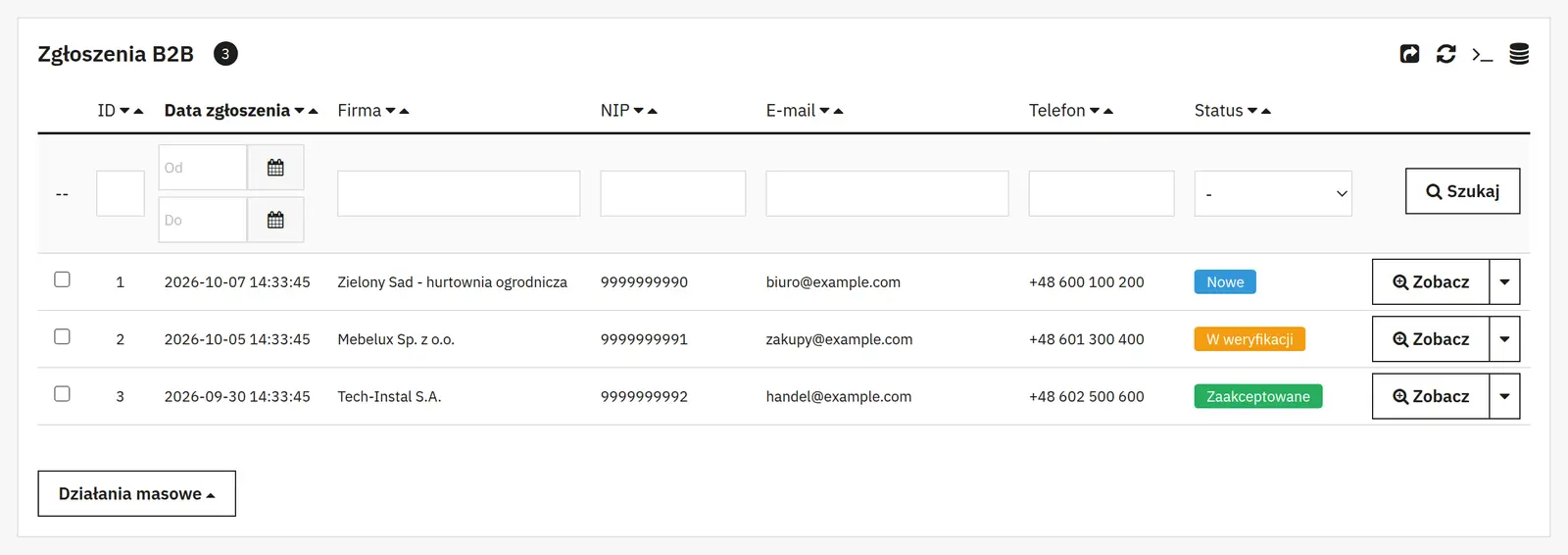
Notes, group automation and B2B discounts
Notes help you keep track of arrangements, while groups and discounts organize the terms of cooperation. Group automations reduce the number of manual changes when serving wholesalers.
Who is this module for?
This is a solution for shops that combine retail sales with cooperation with wholesalers and business partners.
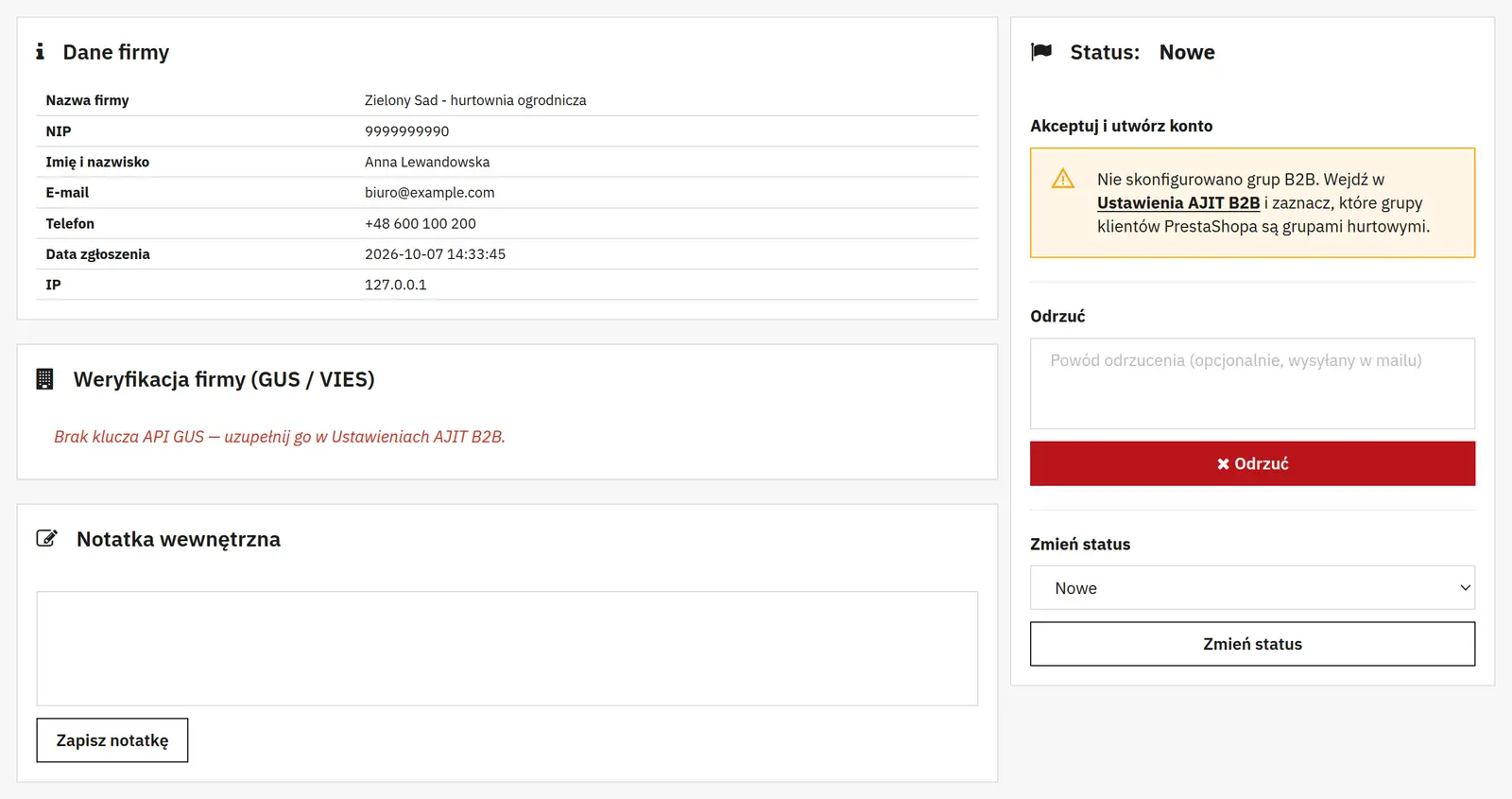
What can you set in the module panel?

01 / Registration and approval
Registration and approval
- Form mode
- The logged-in variant extends an existing account with B2B. The open variant allows an application without an account and provides for creating one on approval.
- B2B groups and default group
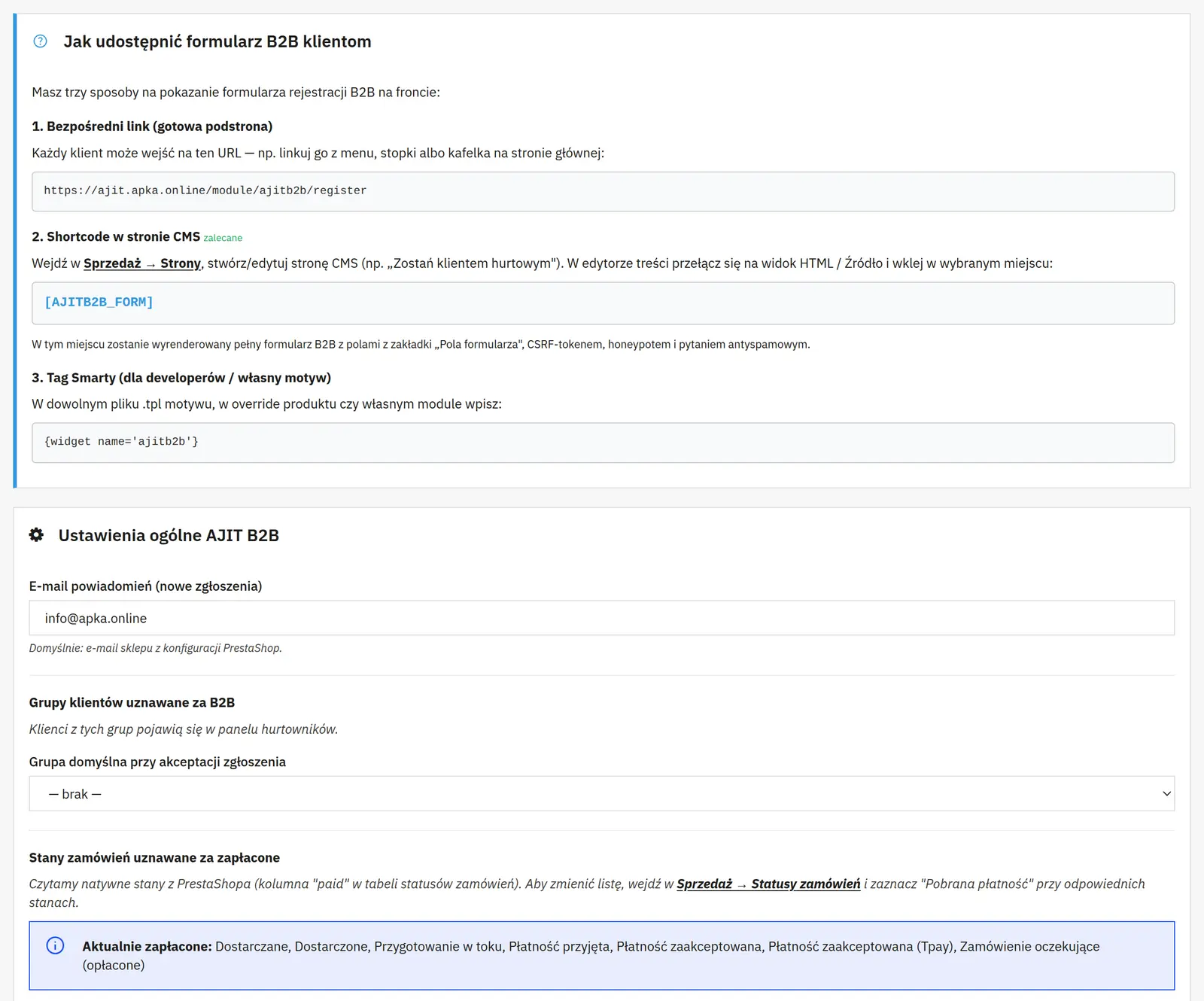
- The first list identifies wholesale customers, and the default group determines the assignment when an application is approved.
- Notifications and password delivery
- The e-mail address is used for new applications. You choose separately how access is passed to a new customer; for an existing account its own login process remains.
- Anti-spam question and GUS
- The control question has a list of accepted answers. A separate GUS key is used for the integration that verifies company data by NIP.
- Placing the form
- The panel provides a direct URL, a shortcode for the CMS and a template call. You choose the method that matches where the form is published.

02 / Field builder
Field builder
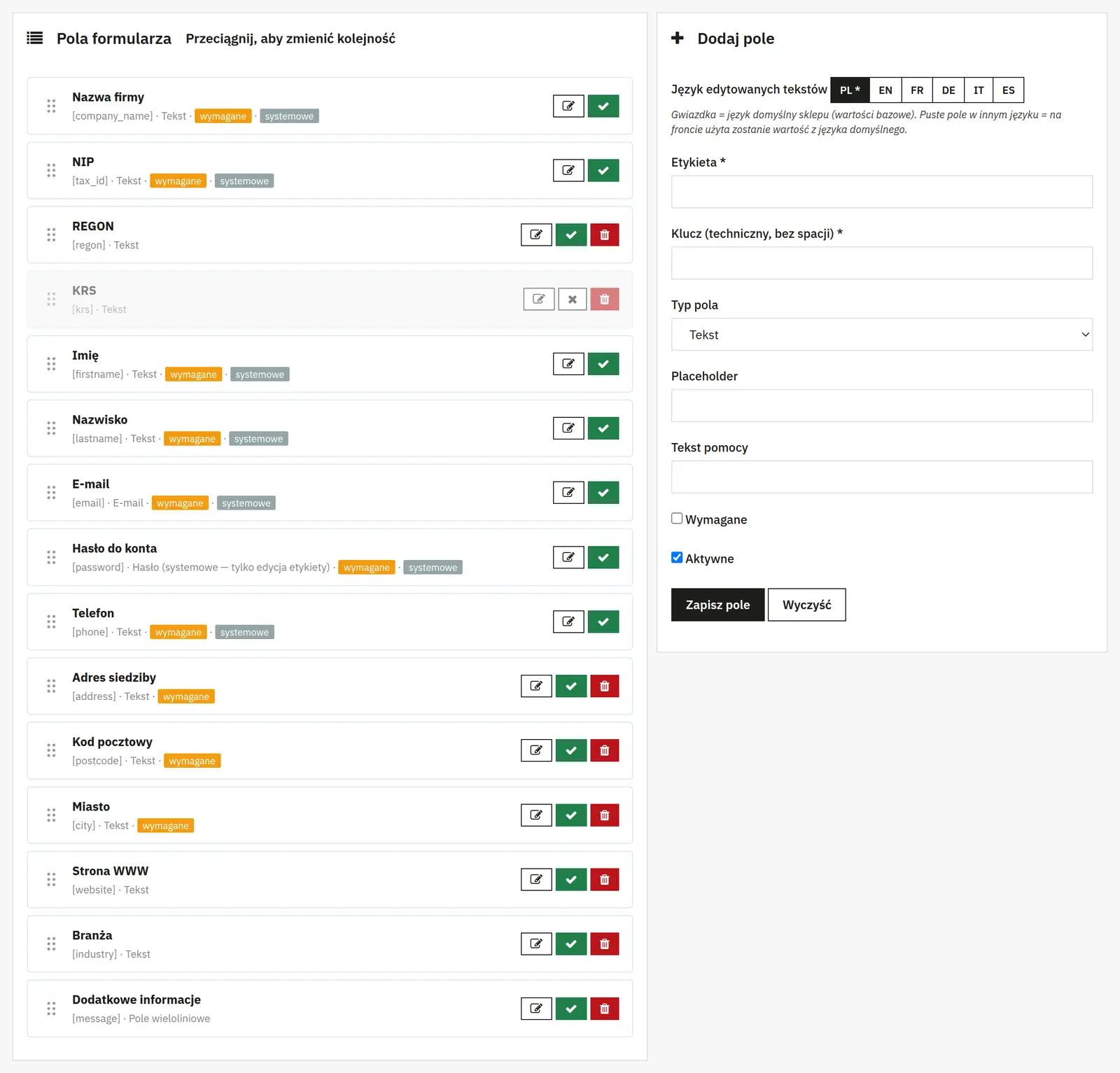
- Label, key and type
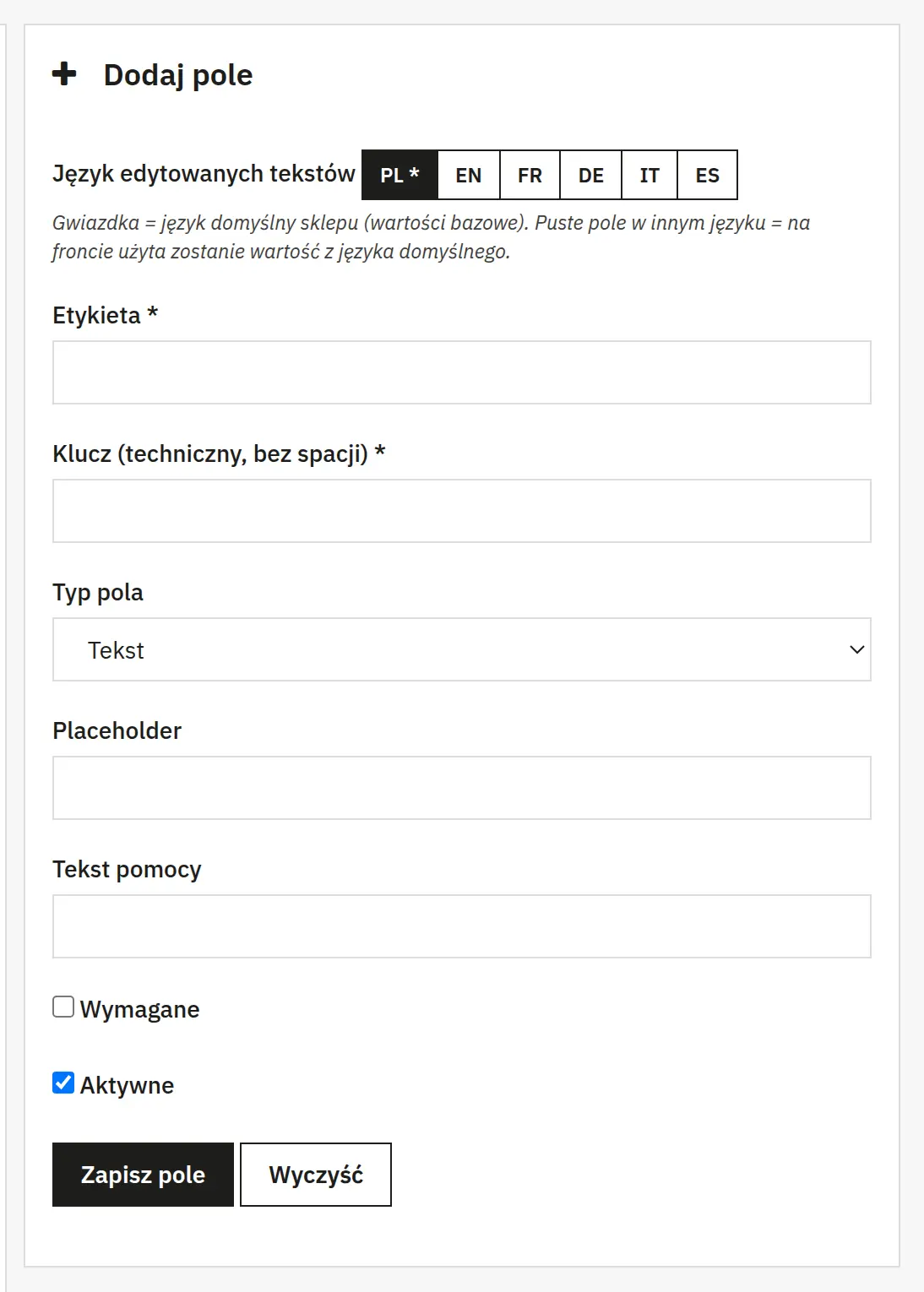
- The label is visible to the customer, the key identifies the field internally, and the type determines how data is entered or selected.
- Placeholder, help and options
- The placeholder hints at the format, the help text explains the field, and the option list defines the available choices. The required and active settings control whether the field is mandatory and visible.

03 / Wholesaler management
Wholesaler management
- Applications and status changes
- From the panel you can approve or reject applications and select a B2B group on approval. Changing the status is a separate action from simply viewing the data.
- Company data, contact and address
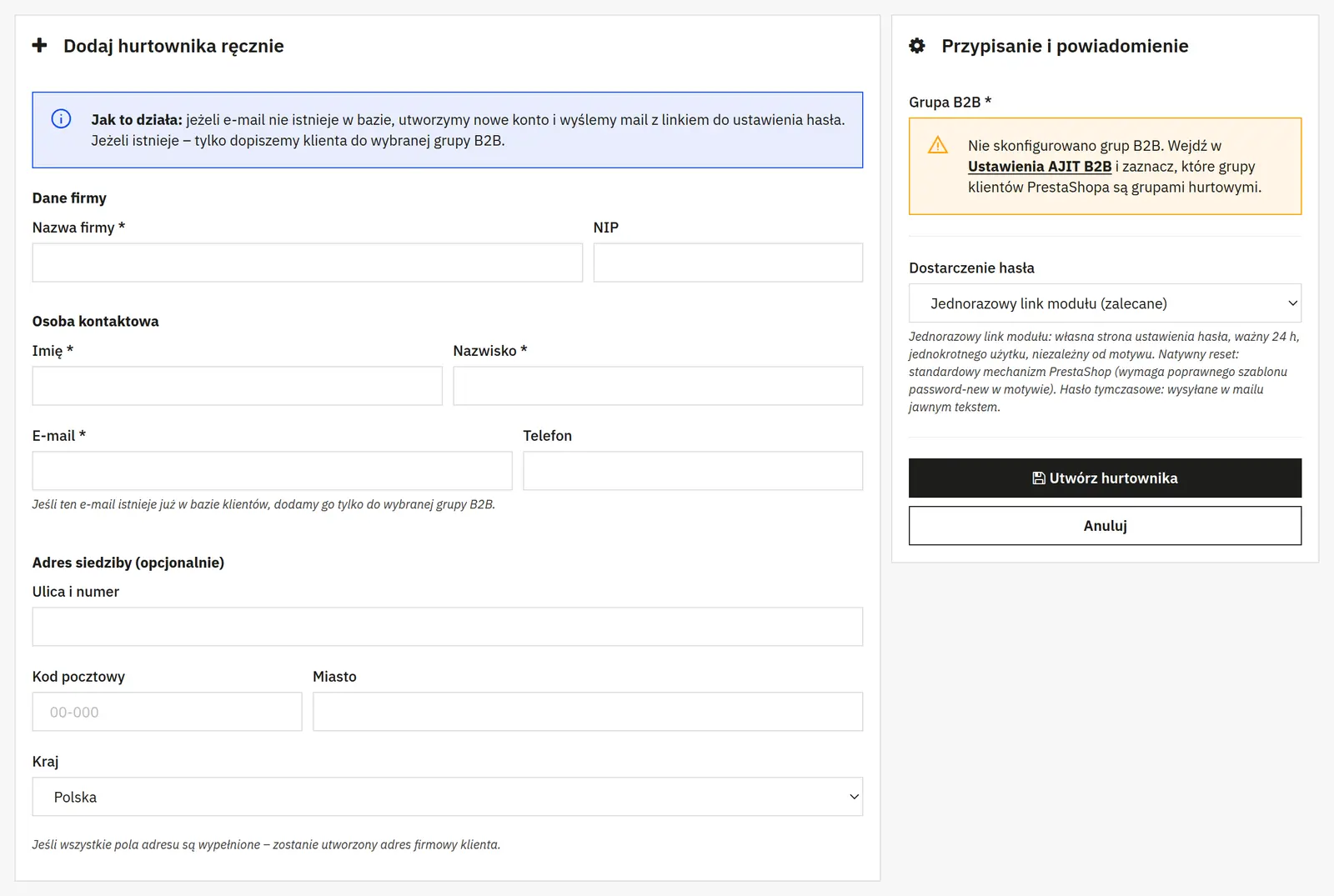
- The wholesaler form covers the company name, NIP, first name, last name, e-mail, phone and an optional registered address and country.
- Statuses treated as paid
- They define which orders the module counts as paid when handling B2B customers.

04 / Prices and discounts
Prices and discounts
- Restricting prices and purchases
- You can allow price viewing and purchasing only for selected customer groups.
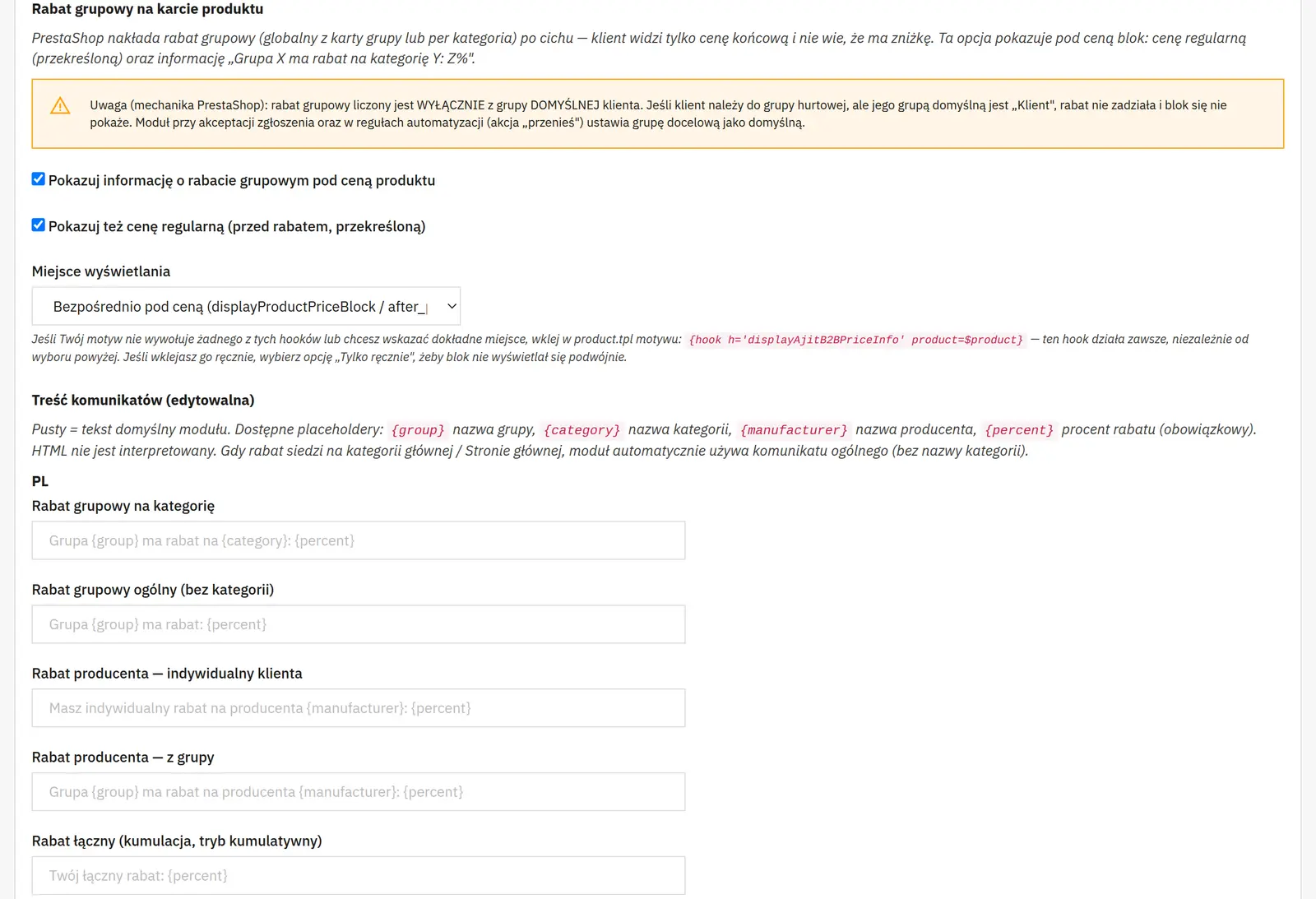
- Group discount, regular price and position
- You enable the discount note and the pre-discount price separately. The position sets where the message appears in the theme.
- Discount message texts
- You edit separate texts for category, group, manufacturer and customer discounts, for cumulation and for the regular price label.

05 / Notes and information
Notes and information
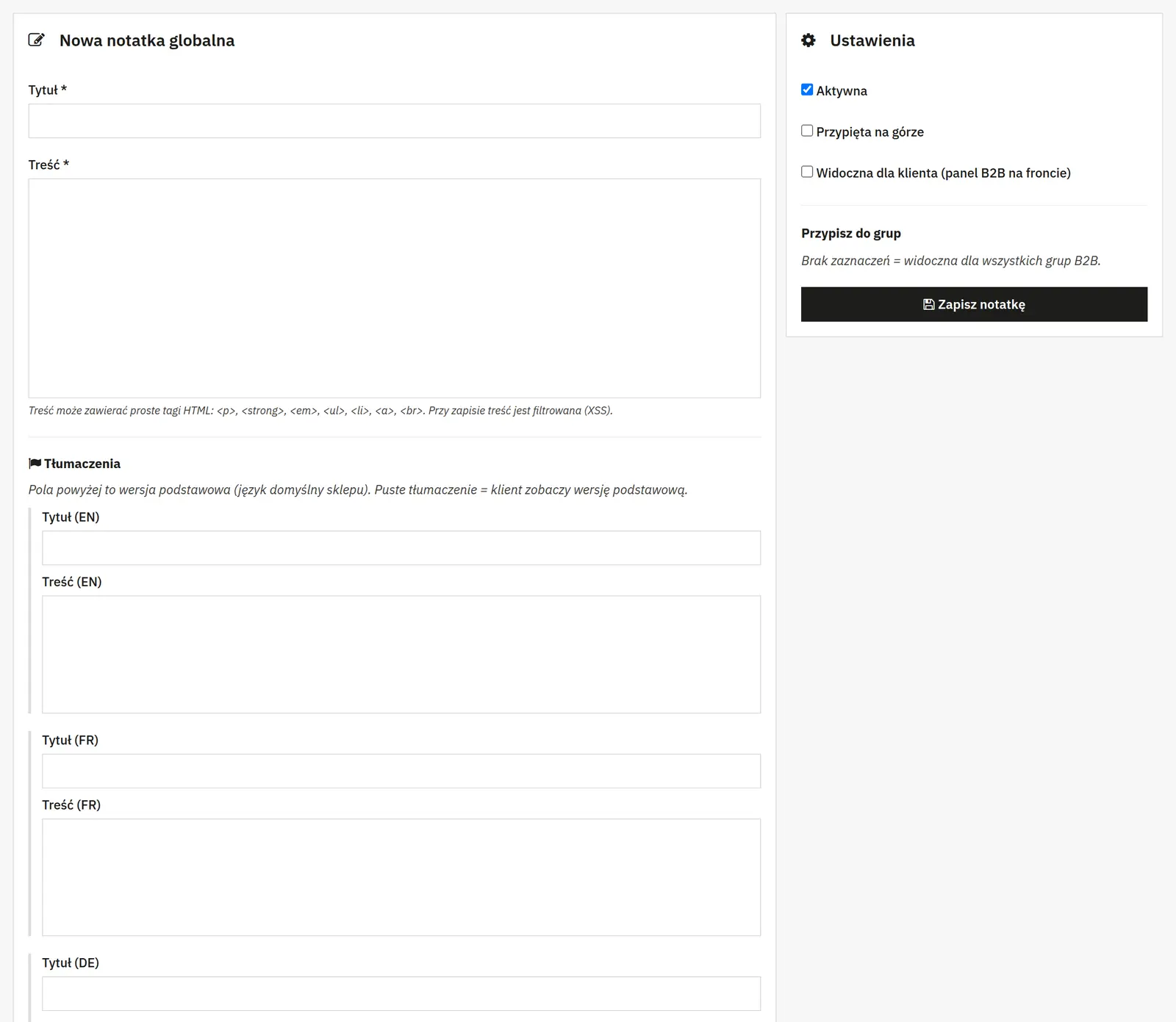
- Title, content and translations
- Information for wholesalers can have language versions. The active state, pinning, customer visibility and recipient groups control how it is published.
- Customer notification
- You can decide whether an e-mail is sent after information is added. An internal note should not be marked as visible to the customer.

06 / Group automations
Group automations
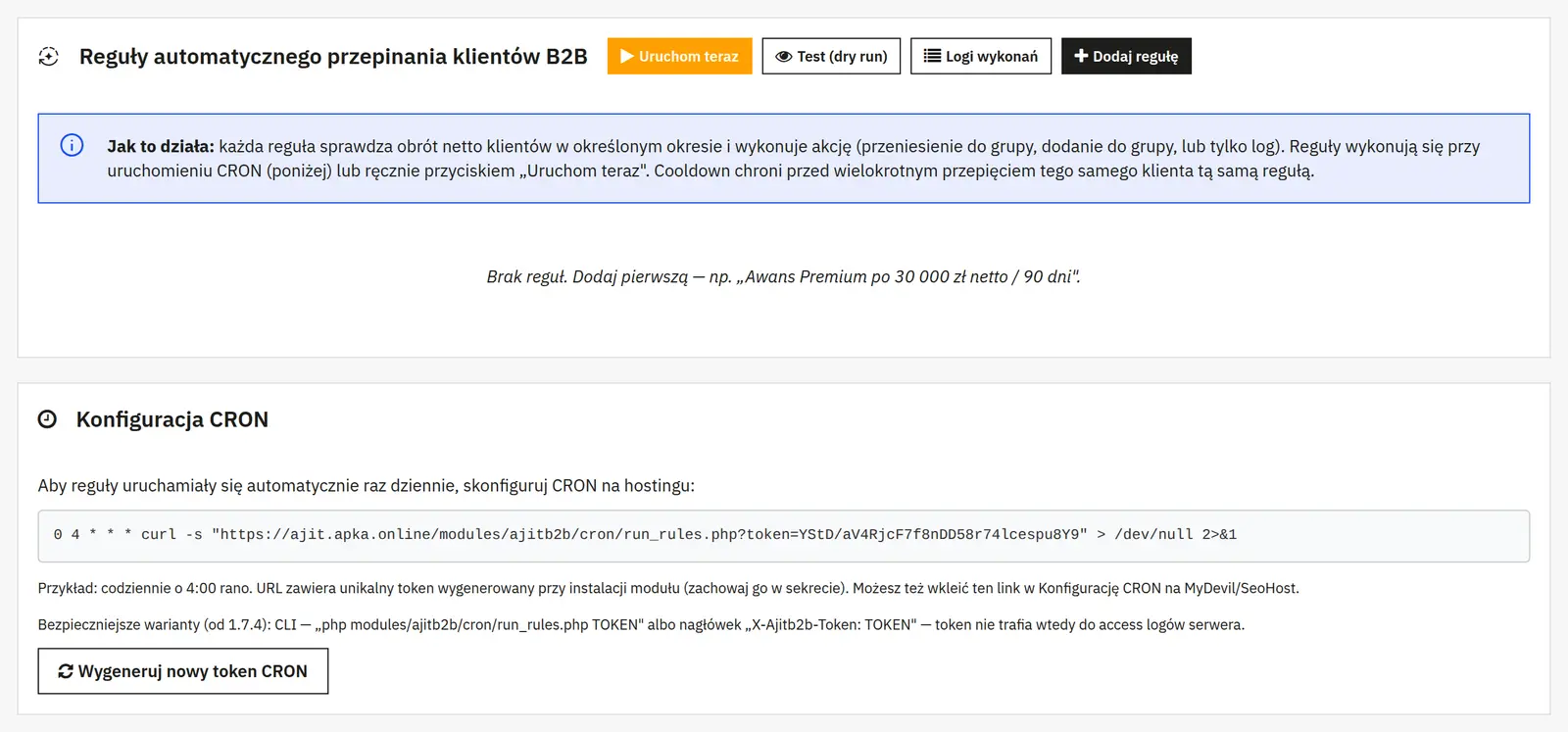
- Name, threshold and turnover period
- The rule checks whether net turnover was reached or not in a given period. Selecting groups narrows the pool of customers evaluated.
- Action and target group
- Moving changes the group, adding keeps the existing assignments, and log-only mode records the result without changing the customer.
- Active state, cooldown and notifications
- The cooldown limits how soon the rule can run again. You enable the customer e-mail and the administrator e-mail separately.
Data sheet
- Version
- 1.7.5
- Last update
- 2026-10-02
- PrestaShop compatibility
- 8.0 – 9.x
- PHP version
- 8.1 – 8.3
- Languages
- DE, EN, ES, FR, IT, PL
- Multistore
- Not tested
- Cron job
- Yes
- Core overrides
- No
- Theme compatibility
- Any theme
- External service required
- Not required
- Source code
- Open, no ionCube
- Licence
- 1 shop (domain), no time limit
- Updates
- Free for 12 months
- Technical support
- Free for 6 months
- Delivery time
- Sent automatically by e-mail
- VAT invoice
- Yes
- Returns
- As stated in the terms
- Package size
- 601 kB
- Demo link
- Link
- Documentation
- Link
No customer reviews for the moment.
1.7.5 16.09.2026 najnowsza
- Hasło jako pole kreatora formularza: własna pozycja, etykieta i tłumaczenia.
- Notatki globalne w wielu językach.
1.7.4 15.09.2026
- Poprawki bezpieczeństwa i stabilności.
1.7.3 15.09.2026
- Cztery tryby przekazania hasła przy zakładaniu konta B2B.
- Poprawki stabilności rejestracji.
1.7.2 11.08.2026
- Poprawki w kreatorze pól formularza.
1.7.1 11.08.2026
- Poprawki stabilności.
1.7.0 11.07.2026
- Tłumaczenia pól formularza zgłoszeniowego.
1.6.0 11.07.2026
- Weryfikacja zagranicznych firm przez VIES.
1.5.1 11.07.2026
- Poprawki stabilności.
1.5.0 11.07.2026
- Dane z GUS widoczne bezpośrednio w zgłoszeniu.
- Ceny i zakupy dostępne tylko dla wybranych grup klientów.
1.4.1 11.07.2026
- Poprawki stabilności.
1.4.0 11.07.2026
- Pełne tłumaczenie na niemiecki i angielski: strona sklepu, panel i wiadomości e-mail.
1.3.0 11.07.2026
- Edytowalne komunikaty bloku rabatowego.
- Poprawki naliczania rabatów.
1.2.0 10.07.2026
- Rabaty na producenta ustawiane osobno dla każdego klienta.
1.1.0 10.07.2026
- Informacja o rabacie grupowym na karcie produktu, z wyborem miejsca wyświetlania.
1.0.6 05.05.2026
- Kafelek opiekuna handlowego w panelu klienta wraz z telefonem i adresem e-mail.
- Wybór opiekuna wprost z listy hurtowników.
- Daty przy notatkach globalnych i sortowanie od najnowszych.
- Przebudowany, lżejszy wygląd panelu B2B, dostosowany do telefonu.
1.0.5 05.05.2026
- Poprawki stabilności.
1.0.4 05.05.2026
- Kafelek B2B zawsze widoczny na koncie klienta, z informacją o zgłoszeniu czekającym na weryfikację.
1.0.3 05.05.2026
- Poprawki stabilności.
1.0.1 05.05.2026
- Karta grupy B2B z paskiem postępu do następnego progu w panelu klienta.
- Formularz zgłoszeniowy do osadzenia w dowolnym miejscu sklepu.
- Obsługa zagranicznych numerów VAT w walidacji NIP.
- Poprawki bezpieczeństwa i stabilności.
1.0.0 29.04.2026
- Pierwsze wydanie produkcyjne.